
Home Technology Cloud 8 Best Cloud Browsers for Long...
CIO Bulletin
,
05 November, 2026
Author:
Guest
A browser agent can successfully complete a five-minute task and still fail when the same workflow spans several hours. A login expires midway through a process, a browser disconnects while an agent waits for approval, or a temporary infrastructure failure erases the progress of an otherwise successful run. The agent may still know what to do, but the environment no longer contains the state it needs to continue.
A long-running workflow does not always require a browser process to remain open continuously. Some tasks need an uninterrupted session, while others can pause, save their state, and resume hours or days later.
The distinction affects which infrastructure capabilities matter most.
Live session continuity: Keeps tabs, page state, and browser processes available while an agent performs extended work or waits for a short interruption.
Persistent authentication: Preserves reusable login information so a new browser session can access an authorized account without repeating the entire authentication process.
Workflow recovery: Allows agents to resume from a saved checkpoint after a browser disconnects, a task fails, or an execution environment restarts.
Human intervention: Provides a way for authorized users to complete authentication challenges, approve sensitive actions, or resolve unexpected page states.
Session isolation: Prevents one customer's cookies, credentials, and browsing activity from affecting another customer's workflow.
Execution observability: Makes it possible to inspect browser actions, review recordings, and understand why a long-running task failed.
These capabilities are related but not interchangeable. Saving a browser profile does not necessarily preserve an open form, and reconnecting to a live session does not guarantee recovery after the browser process has terminated.
Anchor Browser provides managed cloud browser infrastructure for AI agents that need to execute reliable web workflows across authenticated applications, dynamic websites, and enterprise environments. Its platform combines isolated Chromium sessions, persistent identity management, browser automation, and infrastructure designed for large-scale agent execution.
Long-running browser tasks introduce several challenges beyond ordinary automation. Agents may need to authenticate once and return to the same application repeatedly, wait for human input, recover from unexpected navigation states, or process work that continues after the original API request has ended. Anchor Browser addresses these requirements through browser profiles, managed authentication, live session access, and asynchronous task execution.
The platform separates browser execution from the agent's reasoning process. Anchor supports familiar browser automation frameworks, while its task automation capabilities can turn repeatable interactions into deterministic execution steps. AI can then be applied when a page changes or a situation requires additional interpretation, rather than generating every click through a separate model decision.
Key capabilities include:
Managed Chromium sessions: Provides isolated cloud-hosted browser environments for autonomous agents and browser automation.
Persistent browser profiles: Saves authenticated state for reuse across separate browser sessions.
OmniConnect authentication: Supports managed identities, authentication handoffs, and workflows involving MFA.
Asynchronous task execution: Allows long-running automation tasks to execute independently of the initiating request, with status and result retrieval.
Human-in-the-loop workflows: Provides live browser access for authentication assistance, intervention, and authorized user actions.
Deterministic task automation: Supports repeatable browser workflows that reduce dependence on continuous LLM-driven interaction.
Browser access infrastructure: Includes Anchor Chromium, proxy options, fingerprint management, and CAPTCHA handling for supported websites.
Enterprise security and scaling: Offers isolated execution, session observability, MCP and SDK access, and private deployment options for enterprise environments.
Browserbase is a managed browser infrastructure platform that provides cloud-hosted Chromium sessions for browser automation and AI agents. It supports Playwright, Puppeteer, Selenium, and Stagehand, giving development teams several ways to control browser behavior.
For extended workflows, Browserbase offers session management and persistent browser contexts. Contexts can retain cookies and application data between sessions, allowing agents to return to authenticated applications without beginning every task from a new browser identity.
Key capabilities include:
Managed browser sessions: Runs isolated cloud browsers accessible through supported automation frameworks.
Persistent contexts: Retains cookies and application information for reuse across browser sessions.
Stagehand integration: Supports AI-assisted browser interaction alongside traditional automation.
Live session debugging: Allows developers to inspect active browser execution.
Session recordings: Captures browser activity for investigation and replay.
Proxy configuration: Supports network routing options for geographically distributed workflows.
Developer APIs: Provides tools for managing sessions, contexts, and browser execution.
Kernel provides serverless browser infrastructure for AI agents, combining isolated execution environments with browser profiles, managed authentication, and browser automation APIs.
Its approach is relevant to long-running agents because browser activity frequently alternates between periods of intensive interaction and periods of waiting. An agent may need to retrieve a document, process its contents, wait for another system, and then return to the authenticated website.
Key capabilities include:
Serverless browsers: Provides on-demand cloud browsers with isolated execution environments.
Persistent profiles: Reuses authentication and browser state across supported executions.
Managed authentication: Supports secure handling of credentials and authenticated website access.
Browser lifecycle management: Provides controls for launching, connecting to, and managing sessions.
Computer-use support: Enables agents to interact with browsers through supported control interfaces.
Session replay and telemetry: Supplies execution information for debugging and monitoring.
Flexible agent integration: Supports Playwright, CDP, and compatible browser-agent frameworks.
Steel provides an open-source browser infrastructure platform with managed cloud hosting and self-hosting options. Its API gives AI agents access to Chromium sessions that can be controlled through familiar automation frameworks.
For workflows spanning multiple tasks, Steel offers persistent browser profiles that retain relevant authentication state. This is useful when agents repeatedly interact with the same business application but do not need to preserve a single continuously running browser process.
Key capabilities include:
Cloud browser API: Creates and manages browser sessions for agents and automation applications.
Persistent profiles: Reuses browser authentication state between supported sessions.
Open-source infrastructure: Allows teams to inspect and self-host the browser server.
Human takeover: Enables authorized users to interact with active browser sessions.
Session recordings and traces: Supports debugging through recorded browser activity.
Proxy and CAPTCHA integrations: Provides options for handling supported access challenges.
Framework compatibility: Works with Playwright, Puppeteer, Selenium, and compatible computer-use agents.
Browserless provides browser automation infrastructure through hosted browser APIs, session management tools, and self-hosted deployment options. Its services support workflows built with Puppeteer, Playwright, and other browser automation technologies.
Browserless distinguishes between short-term session reconnection and longer-term browser state persistence. Reconnection allows a client to detach and return to a running browser within a supported timeout. When the connection is restored, the browser can retain its open pages, navigation history, cookies, and in-memory state.
Key capabilities include:
Reconnectable sessions: Allows clients to disconnect and return to active browser instances within supported limits.
Persistent session storage: Retains cookies, localStorage, and related browser data across executions.
Session API: Provides explicit controls for creating, reconnecting to, and terminating browser sessions.
BrowserQL: Supports browser automation through a structured query interface.
Framework integrations: Works with Playwright, Puppeteer, and CDP-compatible tooling.
Session recording: Captures browser interactions for debugging and investigation.
Self-hosting options: Supports organizations that need greater control over browser deployment.
Browser Use combines an open-source browser-agent framework with managed cloud browser infrastructure and hosted agent execution. Its technology allows developers to describe web tasks in natural language and use AI models to control browsers through a sequence of actions.
For long-running work, the distinction between the open-source agent library and the managed cloud service matters. The library provides reasoning and browser control, while persistence, hosted execution, and infrastructure lifecycle capabilities depend on the deployment environment.
Key capabilities include:
Open-source browser agent: Converts natural-language objectives into browser interaction sequences.
Managed cloud browsers: Provides remotely hosted execution environments for supported agents.
Reusable browser profiles: Preserves authentication information for recurring workflows.
Hosted agent execution: Runs browser tasks through a managed service.
Computer-use actions: Supports navigation, clicking, typing, and reading browser content.
Custom tools and outputs: Integrates browser agents with application-specific functions and structured results.
Flexible model integration: Supports compatible language models and external execution environments.
Cloudflare Browser Run provides remotely hosted browser execution through Cloudflare's developer infrastructure. It supports browser automation using Playwright, Puppeteer, and Chrome DevTools Protocol connections.
For agents that perform multiple browser operations, Cloudflare provides session reuse capabilities that avoid launching a new browser for every request. Developers can connect to an existing session, create separate browser contexts for isolation, and manage browser lifecycle operations through APIs.
Key capabilities include:
Cloud-hosted browsers: Provides managed browser execution without operating local browser infrastructure.
Session reuse: Allows multiple requests to connect to existing browser instances.
Durable Objects integration: Coordinates stateful agent workflows and session references.
Browser-agent tools: Supports agent interaction through browser control interfaces.
Playwright and Puppeteer support: Enables existing automation frameworks to use Cloudflare browsers.
Live View: Allows developers or authorized users to inspect active sessions.
Session recording: Captures supported execution activity for debugging.
Apify provides a cloud automation platform for running browser-based jobs, web scraping applications, and AI agents. Its execution model centers on Actors, which are configurable programs that run in managed cloud environments.
Unlike a browser infrastructure service that primarily exposes individual sessions, Apify provides a broader environment for executing and coordinating automation jobs. Developers can build Actors using Playwright, Puppeteer, Crawlee, and compatible AI agent frameworks.
Key capabilities include:
Managed Actor execution: Runs browser automation and AI-agent programs in cloud environments.
Long-running jobs: Supports extended automation tasks with configurable execution resources.
Persistent request queues: Tracks pending and completed work across supported executions.
State persistence: Allows applications to save progress and recover after interruptions.
Browser automation frameworks: Supports Playwright, Puppeteer, and Crawlee-based applications.
Scheduling and APIs: Initiates automation through scheduled runs and external integrations.
Execution monitoring: Provides logs, resource usage information, and run status visibility.
Long-running workflows can fail for very different reasons. A browser session may expire while the agent is waiting, or the automation job may restart after completing most of its work.
The table below distinguishes the persistence capabilities that matter for these scenarios.
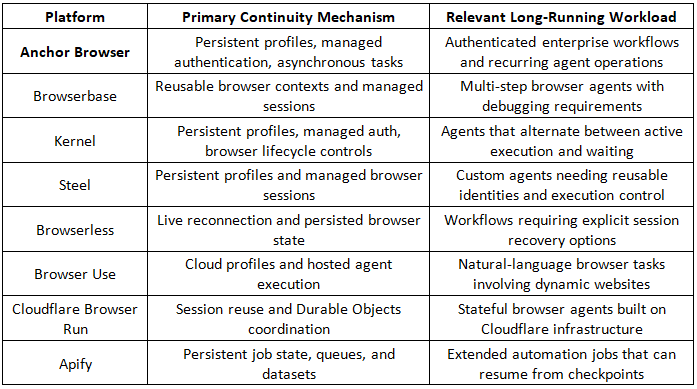
A critical distinction is that persistent authentication is not the same as an uninterrupted browser session. Teams should test what survives a disconnection, what survives a process restart, and what must be reconstructed before an agent can continue.
The most reliable approach is to separate browser state from workflow progress.
Browser state includes cookies, tabs, local storage, and the current page. Workflow progress describes which business actions have been completed, which results have been saved, and which steps remain.
A cloud browser can preserve the first category, but durable automation also needs the second.
A practical architecture includes:
A persistent task record: Stores the workflow objective, task identifier, execution status, and relevant account or session reference.
Explicit checkpoints: Records completed actions after meaningful milestones, such as retrieving a report or submitting an approved form.
Session recovery logic: Attempts to reconnect to an active browser and creates a new authenticated session when reconnection is no longer possible.
Idempotency safeguards: Checks whether a previous action succeeded before repeating operations that create or modify records.
Human intervention states: Records when execution is awaiting authentication, clarification, or approval.
Observable execution: Preserves logs, browser recordings, and useful error information for investigating failures.
For example, an agent collecting invoices from several vendor portals should record each successfully retrieved document. If the browser terminates after the seventh portal, a new execution can continue with the remaining accounts instead of downloading all documents again.
This design also makes infrastructure selection more flexible. An organization can use one browser session for several short actions or create a fresh session for each major stage without losing the overall workflow state.
Infrastructure benchmarks often emphasize browser startup time and maximum concurrency. These measurements are useful, but they do not establish whether an agent can complete an extended business process reliably.
A meaningful pilot should evaluate completed work under representative conditions.
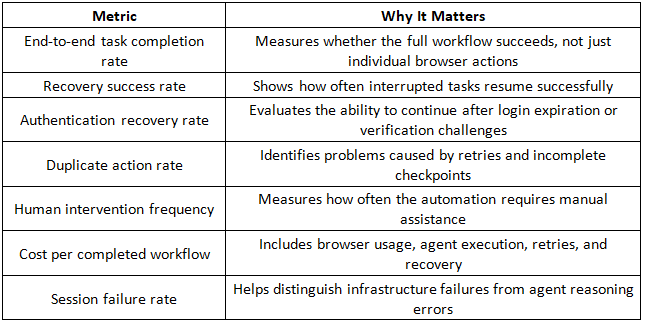
Teams should also run tests with different session lengths and realistic waiting periods. A workflow that succeeds in ten minutes may behave differently when it encounters an approval delay, a temporary website outage, or a scheduled browser restart.
Testing these conditions provides a stronger basis for choosing infrastructure than comparing advertised capacity alone.

















































 consultants ltd.jpg)


Comments