
Home Technology IT Services 5 best digital marketing tools...

CIO Bulletin
,
19 May, 2026
Author:
Guest
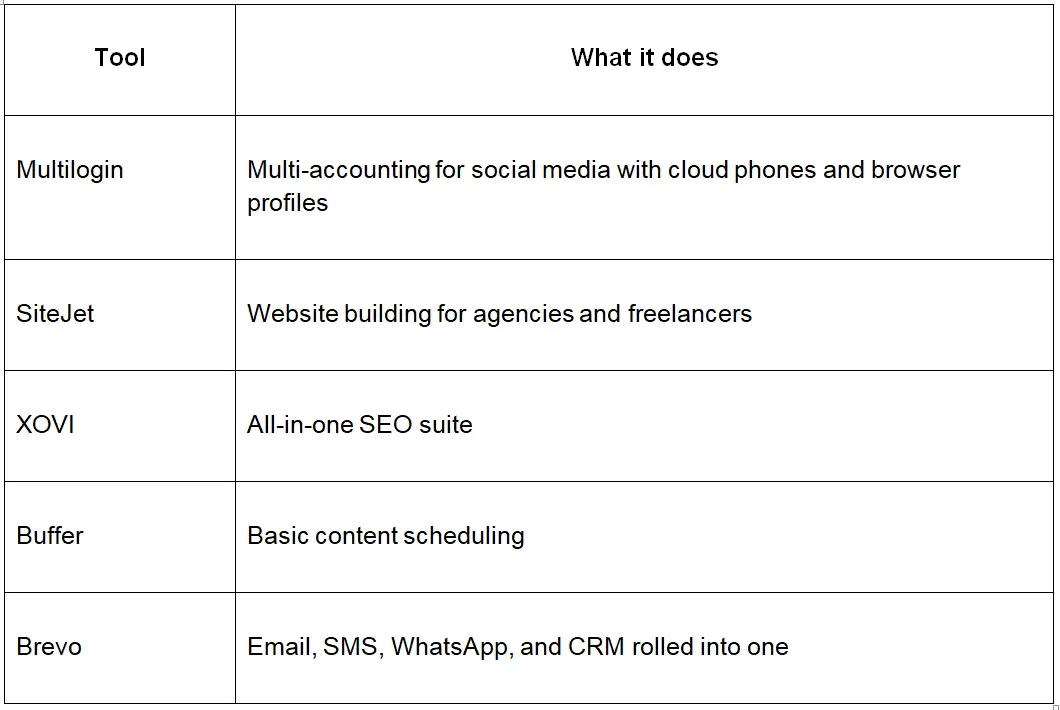
There are hundreds of digital marketing tools floating around in 2026, and most of them are noise. Below are five that actually earn the space they take up in a workflow.
The short version before we get into it:
We only included tools that solve real everyday problems. Each one had to be better than the free or built-in options most people already use. Pricing also had to be realistic for individuals and small teams.
A couple of well-known platforms didn't make it. Popular isn't the same thing as useful.
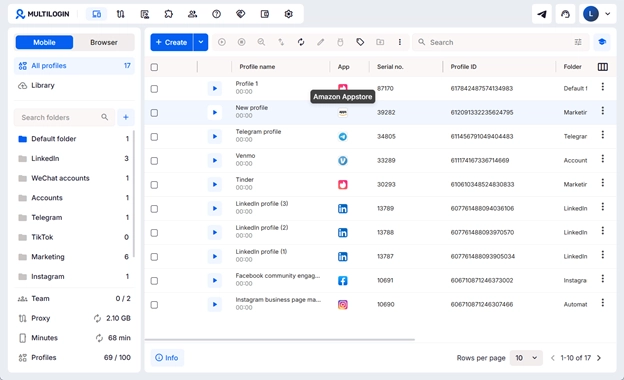
Multilogin is a multi-account platform with cloud phones, browser profiles, and built-in residential and mobile proxies. If you're running more than a handful of Instagram, TikTok, Facebook, Reddit or X accounts, it keeps them from being tied back to one identifiable user. Each account gets its own isolated environment, so as far as the platform can tell, they belong to completely different people.
Instead of buying SIM cards and stacking real phones, you spin up cloud phones from your computer and install Instagram, TikTok, Facebook, or whatever else you need from the built-in app marketplace.
The platform is also becoming more accessible with a new pricing update on May 19. Prices will be converted to USD. You’ll be able to test the full platform with a $2 trial that includes access to all features. Plans start at $7.08/month (billed annually)
Key features:
Browser profiles, each with its own fingerprint, cookies, and session history
Cloud phones running on real Android, no physical devices needed
Built-in app marketplace for Instagram, TikTok, Facebook, Reddit, you name it
Residential and mobile IPs baked in (no separate proxy subscription)
Share profiles across your team without sharing passwords
API for anyone who wants to automate the boring parts
User feedback: Reviews lean strongly positive. Users keep coming back to three points: accounts stay alive, support actually responds, and the cloud phones replace a frankly absurd amount of hardware.
Best for: running multiple accounts, social media marketers, affiliate marketers, creators, ecommerce operations, and social media agencies.
SiteJet is for the people who build websites for a living. Agencies and freelancers shipping client sites week after week, juggling rounds of feedback through email chains until the project ships three months late and everyone is annoyed.
Key features:
Drag-and-drop builder with a deep template library
Live client collaboration baked into the editor, so feedback doesn't live in your inbox
White-label portal you can hand to clients under your own brand
AI suggestions for layout and copy
CRM and project tracking inside the same tool
Drawbacks: Learning curve is steeper than Wix or Squarespace. And if you're used to writing your own code, the customization ceiling can feel low.
Best for: Web design agencies and freelancers handling steady client work.
XOVI has quietly dominated the European SEO market for years. The keyword data holds up. The rank tracker doesn't disappear for three days every time an algorithm twitches. And the on-page audits don't drop 400 issues on you with no priorities attached.
Key features:
Daily rank tracking, desktop and mobile
Backlink analysis with toxicity scoring
On-page audits that rank problems by actual impact
Competitor benchmarking
Optional social and reputation modules if you want them
Drawbacks: The interface looks dated next to Ahrefs or Semrush. And the user community outside Europe is smaller, so good luck finding a niche YouTube tutorial for it.
Best for: In-house SEO teams, content marketers, and SMBs that want real data without an enterprise contract.
Buffer is one of the most basic tools if you want to organize and schedule your content. This platform is developed in a way to schedule your content for accounts that are managed only by you and no one else.
Key features:
Category-based scheduling
Content calendar for planning posts
Basic analytics for post performance
Drawbacks: Like most schedulers, connecting multiple accounts to one dashboard creates account linkage, which platforms can use to flag or suspend them.
Best for: People running two or three accounts, virtual assistants, and small brands that don't need professional multi-account marketing infrastructure.
Brevo, formerly Sendinblue, packs email, SMS, WhatsApp, and a CRM into one platform. If you're tired of running three separate tools for what should be a single workflow, this is a reasonable place to land. The free tier is also actually usable, not a five-day demo wearing a free-tier costume.
Key features:
Drag-and-drop email designer
Automation across email, SMS, WhatsApp, and push
CRM with lead scoring sitting inside the same dashboard
Transactional email API for product notifications
A/B testing, send-time optimization
Drawbacks: Some users report deliverability issues on shared IPs. Support on lower tiers can be slow.
Best for: Ecommerce brands, SaaS startups, and businesses trying to consolidate email and CRM spend.
Each tool above solves a different part of the workflow such as content, scheduling, website building, or analytics. But if you need to manage multiple accounts or social media marketing, your best choice will be Multilogin.
Digital marketing depends on mobile devices more and more each year. So if you want to perform well on platforms like TikTok, Facebook, Instagram, or Reddit, you need to use cloud phones for your marketing.
For social media, Multilogin is the best of the bunch. Nothing else here comes close to what it does for running multiple accounts without losing them. The other four cover the rest of the workflow, websites, SEO, scheduling, and email, and a tight combination of two or three of these used deeply will beat a sprawling stack of fifteen used shallowly every time.














































 consultants ltd.jpg)


