
Home Industry Architecture and interior design CIO Bulletin Guide to the Best...
Architecture And Interior Design
CIO Bulletin, 16 November, 2026
Author:
Ravathi Sunil
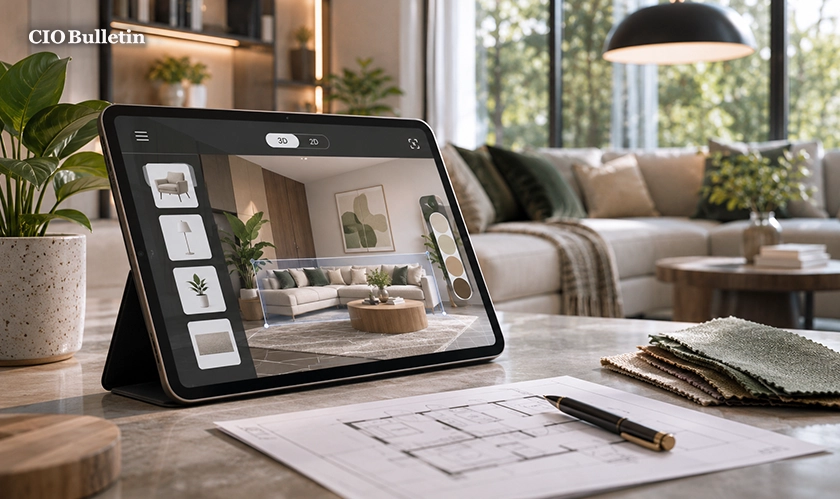
Planning a home used to mean thick catalogues, lots of sketches and a lot of guesswork. Nowadays, your phone can do a lot of that for you. CIO Bulletin looked at what actual homeowners, renters and first-time builders wanted and found that the best interior design apps allow you to test out layouts, colors and furniture before you spend a single penny. The right app can save you time, help you avoid expensive mistakes and make the whole process a lot less stressful.
Interior design apps have also become a lot more accessible. There are loads of them with free versions, simple drag-and-drop functionality, and camera-based features that will show you how a sofa or a paint color will look in your own room. Whether you're starting from scratch or just doing a bedroom refresh, there's something in there for you.
If you're looking for the best apps for designing home interiors, then the list below covers inspiration, floor planning, 3D visuals, and color testing. Features and prices are in a constant state of flux, so be sure to check the individual app store listings before you make a commitment.
1. Houzz
Houzz is a mix of a massive photo library, a furniture marketplace, and a directory of local professionals. You can save ideas, shop products, and use your phone camera to take a picture of your room and see how items would look in it. It's very easy to get carried away and end up spending a lot of money, so it's worth setting a budget first. Best for: inspiration and finding the experts.
2. Planner 5D
Planner 5D lets you draw out your floor plan in 2D and then switch over to a 3D view to walk through it. It has a very large library of furniture and décor, which is ideal for the novice who wants to play around. Some of the more advanced items are behind a paid plan, but the free version is more than sufficient to get going. Best for: the beginner who wants to play around.
3. RoomSketcher
RoomSketcher is all about accurate floor plans and clear 3D visuals. You can either draw the rooms yourself or build them from measurements and then share the plan with your family or your contractors. It's very useful for a renovation where you need to be absolutely certain of the dimensions. Best for: detailed plans and sharing plans.
4. Homestyler
Homestyler provides you with realistic 3D renders and a library of pre-made room designs which you can copy and then modify. If you're struggling to visualize the lighting and materials, then this is the app for you, as it allows you to see what a room would look like in the end without having to learn any software. Best for: realistic visuals.
5. IKEA App
The IKEA app allows you to browse furniture, plan out layouts, and use augmented reality to preview products in your own room. Seeing a wardrobe or a desk at true size will help you avoid the trap of buying things that won't actually fit. Best for: people who are planning to buy from the IKEA range.
6. Magicplan
Magicplan uses your phone's camera to scan a room and turn it into a floor plan. Saves a lot of time on measuring and provides a good basis for renovation planning. Contractors tend to like it, which makes it very useful when talking about budgets and variations. Best for: quick measurements and renovation planning.
7. Pinterest
Pinterest isn't a drawing tool per se, but it's absolutely brilliant for mood boards. You can pull together images, color palettes, and layout ideas in one place and very quickly start to see patterns in what you like. A lot of people will start there to establish their own personal style before they go on to a planning tool. Best for: establishing your own personal style.
8. Sherwin-Williams ColorSnap
Choosing paint is one of the hardest decisions you can make at home. ColorSnap helps with this by allowing you to preview colors on your own walls via your phone camera. You can also match colors from photos you love, which makes selecting a palette a whole lot less daunting. Best for: testing out paint colors.
9. Home Design 3D
Home Design 3D is a pretty good option if you're looking to plan out multiple floors, multiple rooms and the placement of all the furniture. The drag-and-drop interface is very intuitive, so a first-time user can get a basic layout together very quickly. It's a sensible option if you're looking to design a whole home rather than just a single room. Best for: whole home planning.
10. Sweet Home 3D
Sweet Home 3D is a free, open-source tool that runs on your PC. You can draw out your walls, add in your furniture, and then view your design in 3d. The look is a bit simpler than some of the competition, but it's perfectly suited to those looking for a free tool without the need for a subscription. Best for: the cost-conscious planner.
Designing a home is exciting; it can also be quite daunting. The tools listed above help to turn the initial fuzzy ideas into something concrete. Our best interior design apps 2026 list covers the entire process from gathering inspiration on Pinterest through to measuring your room with Magicplan and testing paint with ColorSnap. CIO Bulletin would recommend using two or three of the apps rather than just one, as each has its own particular strengths. You should start with your budget and your style, try the free versions out, and get your plans shared with people you trust before you commit to buying anything.
Pick one inspiration app and one planning app today and sketch out your first room this week. Small tests now can go a long way to preventing big regrets later. For more practical tech and lifestyle tips, keep reading CIO Bulletin, and please share this article with a friend who is in the process of planning a new home.
Everything you need to know about this news
Yes. Planner 5D, Pinterest and Sweet Home 3D all offer free options, though advanced features may need payment.
Yes. Home Design 3D and Planner 5D use simple drag-and-drop tools that suit first-time users.
Not always. Apps help you plan and visualise, but major structural changes still benefit from expert advice.
Sherwin-Williams ColorSnap lets you preview shades on your own walls using your phone camera.
They are usually good for planning, but check key measurements by hand before ordering furniture or materials.




















































 consultants ltd.jpg)


Comments