
Home Technology Cloud How Remote Desktop Access Enab...
CIO Bulletin
,
22 May, 2026
Author:
Guest
The nature of work has shifted in ways that few would have predicted even a decade ago. Employees operate across multiple time zones, from home offices, client sites, co-working spaces, and hotel rooms. Organizations that once relied entirely on on-site presence now manage teams spread across cities, countries, and continents. At the heart of this transformation is a foundational technology that makes location-independent productivity possible.
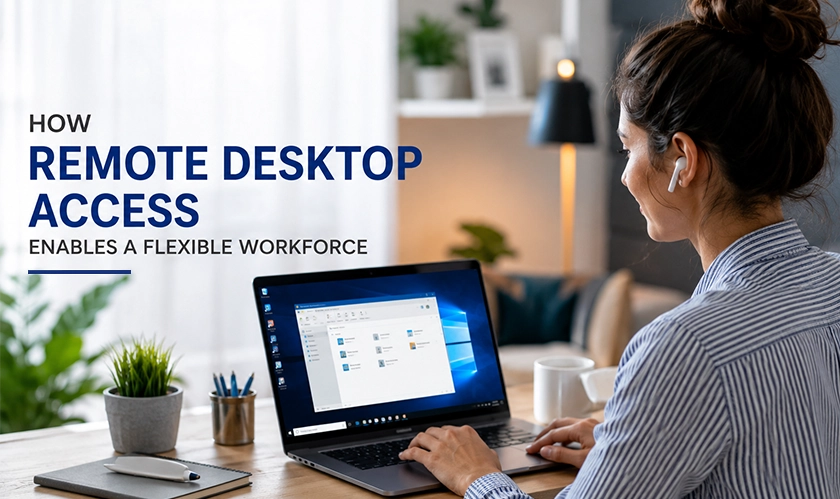
Understanding remote desktop access for home workers is essential for any organization building a flexible workforce strategy. When an employee working from home can open their work computer exactly as it appears in the office, access every application and file they need, and collaborate in real time with colleagues thousands of miles away, geography stops being a limitation. That capability does not happen by chance. It is the direct result of remote desktop technology designed to replicate the in-office experience wherever work happens.
Remote desktop technology allows one device to take full visual and interactive control of another machine located elsewhere. When a user initiates a connection, the session streams the remote machine's screen to the local device, and inputs from the keyboard and mouse travel back in the other direction. From the user's perspective, they are sitting at their work computer. From the system's perspective, the session is secure, authenticated, and logged.
This differs from simply accessing cloud files or joining a video call. Remote desktop access means the full computing environment travels with the worker, including legacy applications, locally installed software, high-performance workstations, and internal network resources that may not be cloud-accessible. For many roles and industries, that capability is not a convenience. It is a prerequisite.
A flexible workforce is only as effective as its ability to maintain productivity regardless of physical location. Remote desktop access removes the dependency on a single physical machine in a fixed place. A designer who relies on a powerful workstation with specialized software can access that machine from a lightweight laptop at home with the same responsiveness and access they would have in the studio. A financial analyst can run the same proprietary tools, on the same data sets, from any approved device.
This continuity is what separates genuine workforce flexibility from a patchwork of compromises. When workers can access their full computing environment remotely, flexible work arrangements become operationally sustainable rather than an exception.
Hybrid work has become the standard arrangement across many industries, with a growing portion of the workforce splitting time between home and office. Managing this distribution requires IT infrastructure that makes both environments function as one. Remote desktop access accomplishes this by keeping the work environment consistent. Whether someone sits at their office desk or their kitchen table, they interact with the same machine, the same applications, and the same data. That consistency reduces the friction of switching between locations and eliminates the need to maintain duplicate setups.
For organizations managing devices across multiple locations, the ability to provision, support, and secure those devices remotely is equally important. Keeping endpoints updated and protected regardless of where they sit is a core component of a well-functioning distributed team. The recommendations outlined in the telework device security guide from the National Institute of Standards and Technology address precisely how organizations should approach securing the devices their remote workers use, from encryption and authentication to software configuration and access controls.
When employees work from home, technical problems do not stop occurring. Hardware issues, software failures, and configuration problems are just as common outside the office as inside it. What changes are needed in the support model to address them? Remote desktop access gives IT teams the ability to connect directly to an employee's machine, see exactly what they see, and work through the problem in real time. There is no need for the employee to describe a screen they cannot read or navigate menus under guidance.
This remote support capability is a significant force multiplier for IT departments managing large or distributed workforces. Rather than being constrained by geography, a small team can support thousands of users across any number of locations with the same speed and precision as an on-site technician.
One of the most significant advantages of remote desktop access over other approaches to flexible work is what it does not do. When a user accesses their work computer remotely, the data itself never leaves that machine. No files are downloaded to the home device. No sensitive documents transit through personal networks in their raw form. Only the visual stream of the remote session passes between the two endpoints.
For industries handling regulated data, from healthcare records to legal documents to financial information, this distinction has real compliance implications. Remote desktop access allows organizations to maintain data residency and control even when their workforce is distributed, because the data stays where it belongs.
Organizations increasingly engage contractors and project-based workers who need access to internal systems without being given permanent network credentials or physical hardware. Remote desktop access allows controlled, session-based access to specific machines, giving temporary workers what they need without expanding the organization's permanent access footprint.
Not every worker who needs flexibility has a high-spec personal device at home. Remote desktop access decouples the experience from the hardware the user is sitting at. A worker on an older personal laptop can connect to a powerful office workstation and benefit from its full processing capacity, storage, and software suite without any hardware investment on either side.
For organizations operating around the clock, remote desktop access allows incoming shift workers to connect to shared workstations and pick up precisely where the previous shift left off. The session history, open files, and working state are preserved on the remote machine, eliminating the handoff friction that can slow operations when teams rotate.
Remote desktop access does not operate in isolation. It is most effective when paired with thoughtful device management practices, clear security policies, and the right authentication mechanisms. Ensuring that every remote session is initiated by an authorized user, from an approved device, over an encrypted connection, is the baseline that makes flexibility safe rather than risky.
As the workforce continues to evolve toward more distributed models, the organizations that get ahead are those that treat remote access infrastructure as a strategic investment rather than a temporary patch. Equipping workers with reliable, secure remote desktop access is one of the most direct ways to ensure that location never becomes a barrier to performance. For teams managing mobile endpoints that support this workforce, understanding the security considerations around those devices is also essential, and the mobile workforce management guide from Samsung Business Insights covers how remote device management tools help keep distributed endpoints protected and operational.
A flexible workforce is not simply one that is allowed to work from different places. It is one that has the tools to do so without compromise.
Cloud storage gives workers access to files from anywhere, but not the full computing environment. Remote desktop access lets workers interact with their entire work machine, including locally installed software, processing power, and internal network resources that may not be available through the cloud.
Yes, provided the session is encrypted end-to-end and strong authentication is in place. Many organizations also require that remote sessions originate only from managed or approved devices to reduce the risk of unauthorized access through consumer-grade home networks.
It is well-suited to knowledge workers, IT teams, designers, analysts, and others who rely heavily on their computing environment. Roles requiring physical presence or specialized on-site hardware may have different requirements, but for the majority of desk-based work, remote desktop access provides a complete and reliable solution.






























 consultants ltd.jpg)


